
RHYTHM-FOCUSED MIDI EDITOR
RhythmHelper
Complex rhythms, made simple.
A rhythm-focused MIDI editor that speeds up everyday programming, and makes polyrhythm, polymeter, and nested tuplets genuinely easy — driving any instrument in your DAW.
Sale ends September 30, 2026
What is RhythmHelper?
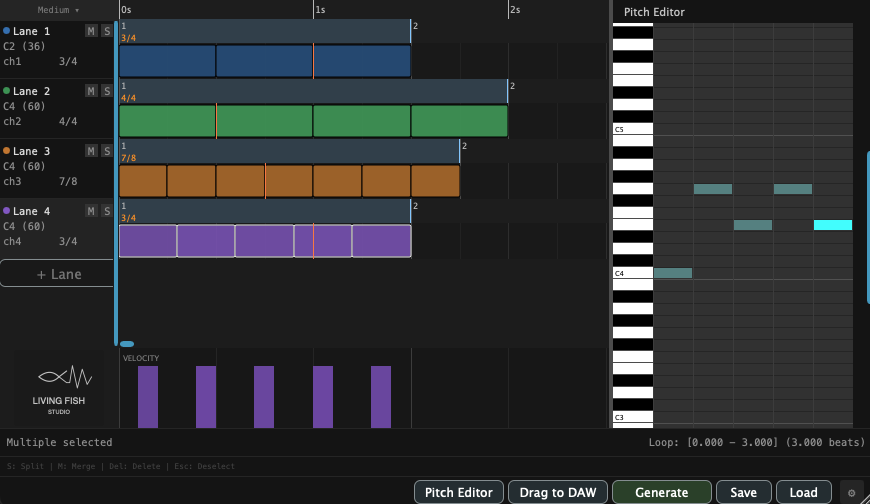
RhythmHelper is a rhythm-focused MIDI editor for designing patterns that other tools make tedious — polyrhythms, polymeter, nested tuplets, and dense layered grooves. It is not only a drum tool: it generates MIDI you route to any instrument in your DAW.
You build everything from one simple operation — placing and dividing blocks on parallel lanes. That simplicity is what lets the patterns get as complex as you want without losing track of them.
What makes RhythmHelper different
01
See how different time signatures relate
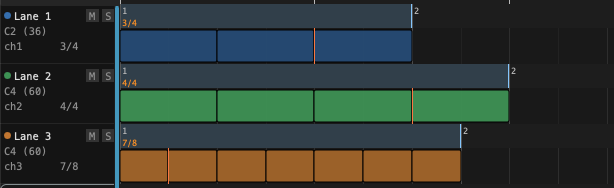
Put multiple rhythm parts on parallel lanes. Each lane carries its own time signature, and the time signature can change from bar to bar. However compound the result, the bar grid shows the relationship between lanes — so you can see at a glance how they relate, whether they realign or hold a deliberate offset, without fighting your DAW.
02
Tuplets are just block subdivision
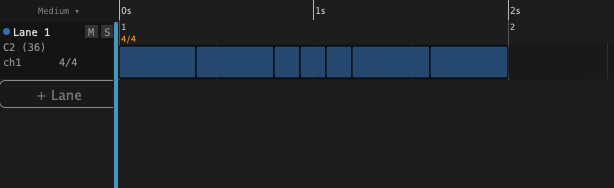
There is one operation: split a block. Divide a whole note into four; divide one of those again. Because every division is the same move on a smaller block, tuplets nest as deep as you like — 5-in-3, 7-in-4, nested 3-in-5-in-4 — limited only by note values becoming impractically small.
03
Every block can be a chord
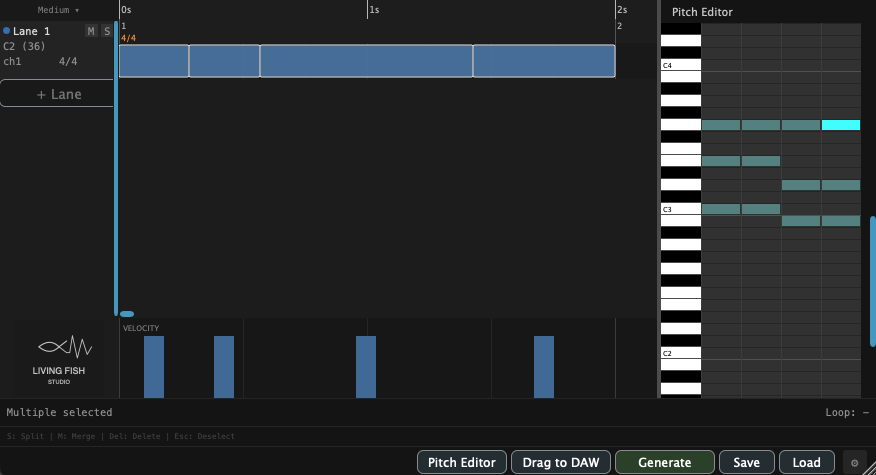
Each block holds any chord or single note, not just a drum hit. RhythmHelper emits MIDI you route to any sound source in your DAW — piano, synth lead, chord pad, or drum library.
See RhythmHelper in action
Use cases
Anything fundamentally rhythmic fits, regardless of instrument.
CONTEMPORARY · PROGRESSIVE · MATH ROCK · JAZZ · FUSION · MINIMAL · FILM SCORE
Polyrhythmic Drum Kits
Lay drum patterns against other instruments in different time signatures. Each lane has its own time signature, and the bar grid shows how they relate.
Chord Comping & Ostinatos
Build a piano part with chord or single-note blocks. The Pitch Editor handles the voicings; the lane handles the rhythm.
Phase & Pulse Patterns
Two lanes at the same tempo, slightly different lengths, phasing against each other. Polymeter does this without DAW gymnastics.
Tuplets & Nested Tuplets
5-in-3, 7-in-4, nested 3-in-5-in-4. Press a number or ratio and the block divides. Build any pattern from these simple operations.
Before you buy: is RhythmHelper right for you?
RhythmHelper is a focused tool, not a do-everything one. Knowing what it does not do saves you a disappointing purchase.
- It does not generate rhythms automatically. It is an editor, not a pattern generator. You shape every block intentionally.
- It does not produce sound on its own. Route its MIDI to an instrument in your DAW — a sampler, synth, or drum library.
- It does not accept real-time performance input. MIDI keyboard input is supported for note entry only, not live playing.
The free version is the full plugin — with one limit
All MIDI output — both playback and drag-to-DAW — is capped at 4 bars in the free version. A license removes the limit. Download the free version first to confirm RhythmHelper fits your workflow.
Specifications
| macOS | Windows | |
|---|---|---|
| Format | AU / VST3 | VST3 |
| Architecture | Universal (Apple Silicon / Intel) | 64-bit |
| OS Version | macOS 12+ | Windows 10 |
| Tested DAWs* |
VST3: Reaper AU: Logic Pro, Luna * tested with Apple Silicon. |
VST3: Reaper
* tested on Windows10. |
| Not supported | All other DAWs, including Ableton Live. | |
Don't see your DAW? DAWs not listed above are not supported, including Ableton Live. If you still want to try, use the free version to check whether the plugin works in your DAW before purchasing.
Perpetual License
Get Your License
Launch Sale · Save 48%
Sale ends September 30, 2026